I use the My Tracks application on my Google Android phone to record GPS coordinates for hiking and mountain biking trails. I use it instead of other similar apps because it allows me to easily upload recorded GPS coordinates to a Google Map and then share that map on this blog. What’s more, I have access to all of the data collected by My Tracks whereas other applications require that you store all of your data on their web site.
Recording GPS Coordinates of Trails
After I have completed an adventure, I upload the corresponding coordinates from my phone to Google Maps; at which time they become viewable on the maps displayed on this blog. The following map shows the Huckleberry Trail; a paved trail that runs from Blacksburg, VA to Christiansburg, VA. It includes a green marker for my starting point and a red marker for my ending point.
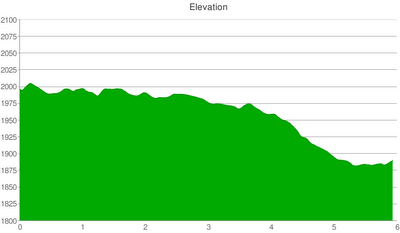
As I am moving, My Tracks records GPS coordinates, speed, distance, and elevation changes. The following is an elevation chart generated during my ride on the Huckleberry Trail. As you can see it is mostly a downhill ride going from Blacksburg to Christiansburg.
I have used My Tracks on three phones:
- Samsung Moment on Sprint – It worked well, at times, recording GPS coordinates for the Poverty Creek Trail System; which is close to Blacksburg, VA and an area were I get strong service from Sprint. It was unable to obtain a GPS signal in areas where I did not have a cell phone signal (e.g., our hike in Mountain Lake, VA). However, it would maintain a GPS signal when transitioning from an area with cell phone service into an area without. Thus, for remote trails, I recommend turning on My Tracks before entering an area without cell phone service to increase the chance of being able to record GPS coordinates. A big issue with the Moment was its weak battery life so longer adventures could not be recorded.
- Motorola Droid on the Verizon – It records very accurate GPS coordinates on hiking trails in the dense woods of New York whereas my Samsung Moment always struggled to record accurate coordinates in the dense woods of Virginia.
- HTC EVO Shift (current phone) – It performs similarly to the Motorola Droid and is significantly better than my old Samsung Moment. In addition, it has a much longer battery life and better power management tools so I can now record coordinates for longer adventures.
Tagging Pictures with GPS Coordinates
With the Samsung Moment, I had limited success uploading photos to Google My Maps with the Google My Maps Editor Android application. Recently, Google discontinued that application so now I recommend the following multi-step, multi-device process:
- Open the “My Tracks” application
- Click “Record track”
- When you reach a picture-worthy location, click “Markers”->”Insert waypoint”->type marker name and description
- After inserting a way point and standing in the same location, take a picture with a digital camera (can be your phone’s camera or a separate camera)
- After you finish a trail, click “Stop recording”
- With your track pulled up, click the three dots in the bottom right of the screen and select “Send to Google…”->”Send to…Google My Maps”
- However you see fit, upload your corresponding photo to a Google Picasa Web Album (or other photo sharing site) and copy the shareable URL for the photo.
- From a PC, laptop, or tablet: go to maps.google.com and click “My Maps”->Select a Map->Click “Edit”
- Find your way point marker, click it, click the “Upload Image” icon, and insert the URL of your photo. Also, click on marker’s icon, click “Add icon”, and insert the URL of your photo again so that it will be obvious that that marker is a photo.
- Click “Save” and “Done” on Google My Maps. Now, you are ready to embed your map on your web site and have your GPS coordinates complemented with photos.
Click the picture marker in the center of the following map to see a geotagged picture of a log bridge in the Carvins Cove trail system.
Carrying My Phone
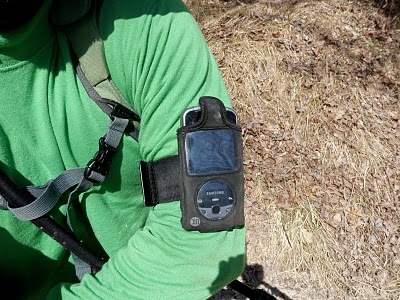
Originally, I squeezed my phone into an iPod athletic armband because I thought it gave my phone the clearest path to GPS satellites. Although this armband hack works, it does not protect my phone from rain or a fall into a puddle. In addition, my armband bounced around too much while mountain biking. More recently, I have had success simply putting my phone in my pocket or hydration pack and have not noticed any degradation in accuracy.
Accuracy of GPS Data
The accuracy and effectiveness of using a phone to record and document trails is somewhat limited so recorded tracks, elevation charts, and picture locations are more like estimates rather than products of an exact science. Specifically, the accuracy of GPS points can be as good as +-20 feet or much worse if trees, buildings, or other obstructions are blocking GPS satellites. The elevation readings are less accurate than the GPS coordinates and can be off by hundreds of feet. However, a set of elevation readings should generate a chart with an accurate representation of incline and decline.
There are adventures documented on this blog that took place before I started using My Tracks in mid-November 2009 and, thus, those posts do not include these nifty new features.


I'm getting homesick 🙂 I'm a Virginia Tech grad but I've lived in CA since college. I ran cross country at VT but now do mostly hiking and walking. For any of the above though, this application is great. At present I'm having trouble uploading my tracks/treks but hope to resolve that quickly.
Alan, thank you for your comment. I too am having trouble uploading my tracks to Google Maps. I am hoping that the next release of My Tracks solves the problem. In the meantime, you can email yourself a track's KML file and then import it into your Google Map.
Very cool. This is exactly what I want to do for my blog (hikingsaltlake.com).What I've been doing is loading Google maps and simply clicking a line across the trails/roads I traveled. This works okay except when trees, snow or other conditions make it impossible to see the trail.My cellphone is the Samsung Highlight. This phone has GPS but the only application installed or available is one that gives you directions to a location.I don't know if software is available for this task, or if I just need a new phone (again).
Jonathan, thank you for your comment. Your blog looks cool and I like your pictures that identify animal tracks. I have a tracker's field guide but have yet to put it to good use.Before getting a Google phone, I used to do what you do but found it to be too time consuming. I recommend a phone running Google's Android operating system because you can then download the My Tracks application, which makes it easy to record GPS coordinates and then upload them to your Google Maps account for sharing on your blog. Let me know if you have any questions about the process.
My Nexus One phone does NOT geotag photos unless a network connection is available while taking the photo – this is a completely HORRIBLE defect as I often take photos in remote locations. Many other Android phones have this same bug.
hi i am in kenya and would like to map my village and the surrounding villages schools clinics etc -i have a google android phone and will be using my bike for this work. hope the tracks app can do well perharps. my name is zack materelusitche (facebook) from seregeya village western kenya thanks
Hi,Thanks for posting this tutorial.I tried to follow it and had as couple of problems adding the photos.1. In picasa web I don't see any shareable URL for the photo. I only see embed tags and link to the picasa page itself (like a permalink), but no sharable URL for the image itself.2. In maps.google.com when I click on a way point marker it does not have "Upload Image" icon, just the standard image of rich text editor which does not support upload.Any idea why I don't see those things? Are there different versions of those apps?Thanks!
San, thank you for your comment. For picasa photos, I right-click on an image and select "copy image URL". Google Maps doesn't support the uploading of pictures so you have to provide a URL for an image. Does that help?
Nice app but a couple of questions. Can I not view the map as terrain? I have only found satellite and map. Also, is there anyway to create a map to work offline for when I don't have service?
Thomas, if you upload your MyTracks maps to Google Maps (i.e., Send to Google) then you can view them from the standard Google Maps app on your phone by clicking "Layers"->"My Maps" . The standard Google Maps app has terrain mode. In addition, I believe the most recent version has an offline mode but I have not tried it yet.
I continue to have trouble with images. I uploaded to picas and a google site. The images show up on my pc using Firefox and ie. They even show up on my phone using the browsers…but the images do not appear with the maps app. Just a question mark. I've noticed the rich text method defaults to http whereas both picas and google sites are https. Any ideas?
I can see my pictures from the Google Maps app in my Google Android phone. I'm not sure why it isn't working for you but I have had random problems with editing map markers in Google Maps such that changes I've made are lost. I would try an image URL with http instead of https. Also, I would test it on other peoples' phones.
I use "iMapMyRide" for hiking and bikeing. It works offline. Looks very simular to "My Tracks"
I like My tracks but it’s still lacking in a few areas. I would like to see choices for marker icons (any editing done to these in Google Maps revert back even after saving) and an option to attach a picture to a waypoint. I would also like to see an option to cache parts of the map. Basically give me Google Maps with the ability to mark and save a path
I’ve used GPS Essentials on my two android phones to map my hikes. You can add waypoints (with pictures), get the KML file to export to Google Earth, etc. It also comes with a lot of other nifty features like compass, waypoint viewer through camera (augmented reality) and a dashboard with quick access to a lot of customizable info. You should try it out.